The Instagram Chronological Feed: What It Is and How to Use It
If your Instagram feed feels noisy, unfamiliar, full of accounts you don’t remember following, constant suggestions, or just wall-to-wall ads, you’re not imagining it.
Instagram’s default Home feed is algorithm-led. That means posts are shown based on predicted interest, not when they were posted. Ads, suggestions, and reshuffled content often appear before updates from people you actually know and follow.
What many users don’t realise is that Instagram does offer a chronological feed. It’s just not the default.
What is the chronological feed on Instagram?
The chronological feed shows posts in the exact order they’re published, newest first.
No reshuffling.
No suggested accounts.
No ads.
Just posts from people you already follow, shown in real time.
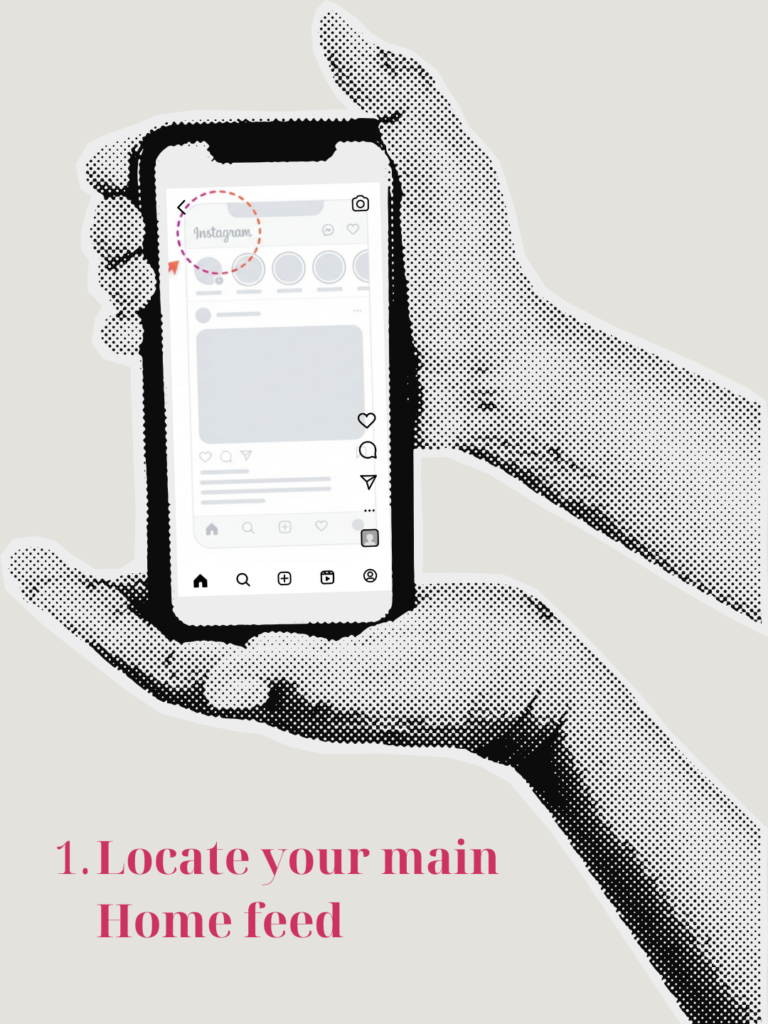
To access it, go to your main Home feed, tap the Instagram logo at the top centre of the screen, and you’ll see two options: Following and Favourites.

Following vs Favorites: what’s the difference?
Following
The Following feed shows all accounts you follow, in chronological order, with no ads or suggestions.
It’s the closest thing to “old Instagram”.
The catch is that Instagram doesn’t allow you to set this as the default, so you’ll need to switch to it manually each time you open the app.
Favorites
The Favorites feed is a curated version of the chronological feed.
It shows only accounts you’ve personally selected, in chronological order, creating a quieter and more intentional experience.
Favorites also subtly influence your main Home feed, helping those accounts appear higher there too.
How to add accounts to your Favorites on Instagram:
Option 1: From the main feed (quickest)
Open Instagram and go to your Home feed.
Tap the Instagram logo at the top centre.
Tap Favorites.
Tap Add to Favorites.
Search for accounts and add them (up to 50).
Accounts are not notified when you add or remove them.
Why this matters (especially for small businesses)
This isn’t a growth hack.
It’s a user behaviour shift.
Chronological feeds matter because they reward consistency, not virality. Smaller businesses benefit when followers actively switch to them, and engagement here tends to be more intentional and higher quality.
Posts can perform “better” in real terms, even with fewer likes, because strong comments, saves, and genuine interaction often replace vanity metrics.
This also explains why some posts feel more meaningful, even when reach looks lower.
The takeaway:
Instagram hasn’t removed connection.
It’s just hidden it behind a tap.
For personal users, the chronological and Favorites feeds offer a calmer, more human way to use the platform. You see what matters to you, without constant interruptions from ads and irrelevant content.
For businesses, they reinforce a simple truth: showing up consistently, clearly, and honestly still works, especially when people choose to see you.

Instagram doesn’t need to feel this loud.
If you’d like a calmer approach to content that actually connects, we should talk.